
End
The final step that closes the journey and communicates the result
The End node is the final step of every journey. It closes the verification flow, stores the session result, and shows the user a closing screen.
Every journey must include exactly one End node.
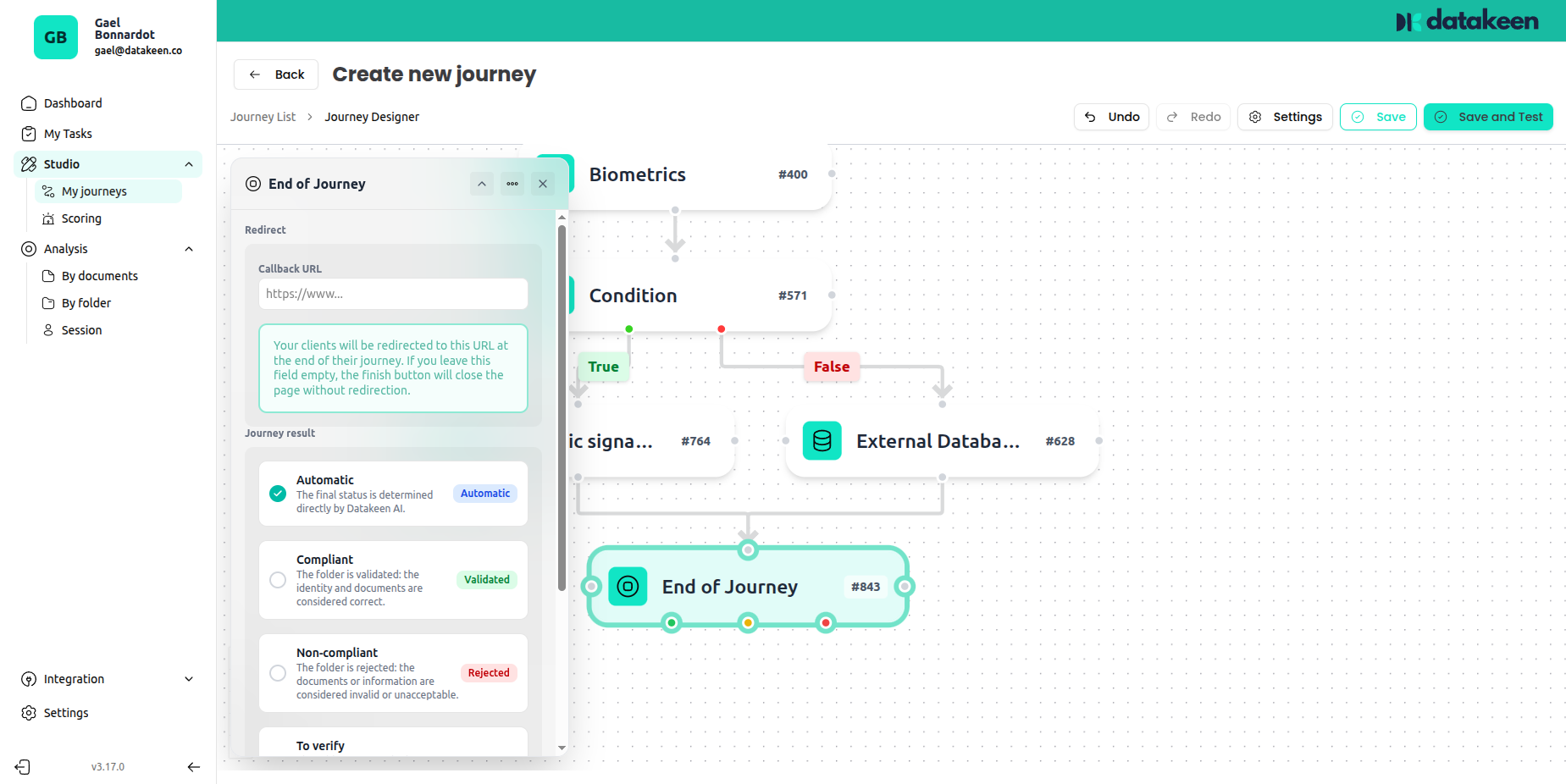
Session results
When a user reaches the End node, the session is assigned a result. This result determines what the user sees and how the session appears in your back office.
There are four possible outcomes:
✅ Automatic
Datakeen automatically determines the result based on the AI analysis of all verification steps. This is the recommended option — it means you don't need to manually set an outcome; the system does it for you based on what was found.
Example: If the identity document passed all checks and the selfie matched, the result will be "Compliant". If issues were detected, it will be "Non-compliant" or "To review" depending on the severity.
✅ Compliant
The session is unconditionally marked as compliant when the user reaches this End node. Use this when the logic of your Condition nodes already filtered out non-compliant cases — anyone who reaches this End node has passed all your checks.
❌ Non-compliant
The session is unconditionally marked as non-compliant. This is typically used as the failure endpoint of a Condition branch — if the user took the "failed" path, they arrive at an End node configured as non-compliant.
⚠️ To review
The session needs manual review by an analyst before a final decision is made. Use this when the automated checks raised flags but didn't produce a definitive result.
What your users see
When a user reaches the End node, they see a closing screen on their device. The message varies based on the result:
- Compliant → A confirmation message, typically thanking them and indicating the process is complete
- Non-compliant → An explanation that their submission could not be validated, with guidance on next steps if applicable
- To review → A message indicating their case is being reviewed and they'll be contacted
You can customise the message shown for each outcome in the node settings.
Back office callback
You can configure a webhook in your Advanced Settings to be notified automatically when a session reaches its End node. The webhook sends the session ID and result, allowing you to trigger downstream actions in your own systems (e.g. update a CRM, send a confirmation email, unlock access).
Tips
- In a journey with a Condition node, you'll typically have two End nodes: one for the "pass" path and one for the "fail" path.
- Use Automatic as your default — it gives you the full benefit of Datakeen's AI analysis without needing to hardcode an outcome.
- The End node result feeds directly into the analytics dashboard and the By document / By session analysis views.
Updated 2 days ago